

Can you change a YouTube thumbnail (or title) after upload?
Yes.
You can update your thumbnail and title after a video is already published. That’s normal—and a big part of how serious creators improve performance over time.
A thumbnail/title change mainly affects:
- Click-through rate (CTR)
- How many people YouTube chooses to show your video to (impressions)
- Traffic from Browse and Suggested
It won’t magically save a video with bad retention, but it can fix packaging that’s under-selling (or mis-selling) a good video.
How to change your YouTube thumbnail (desktop)
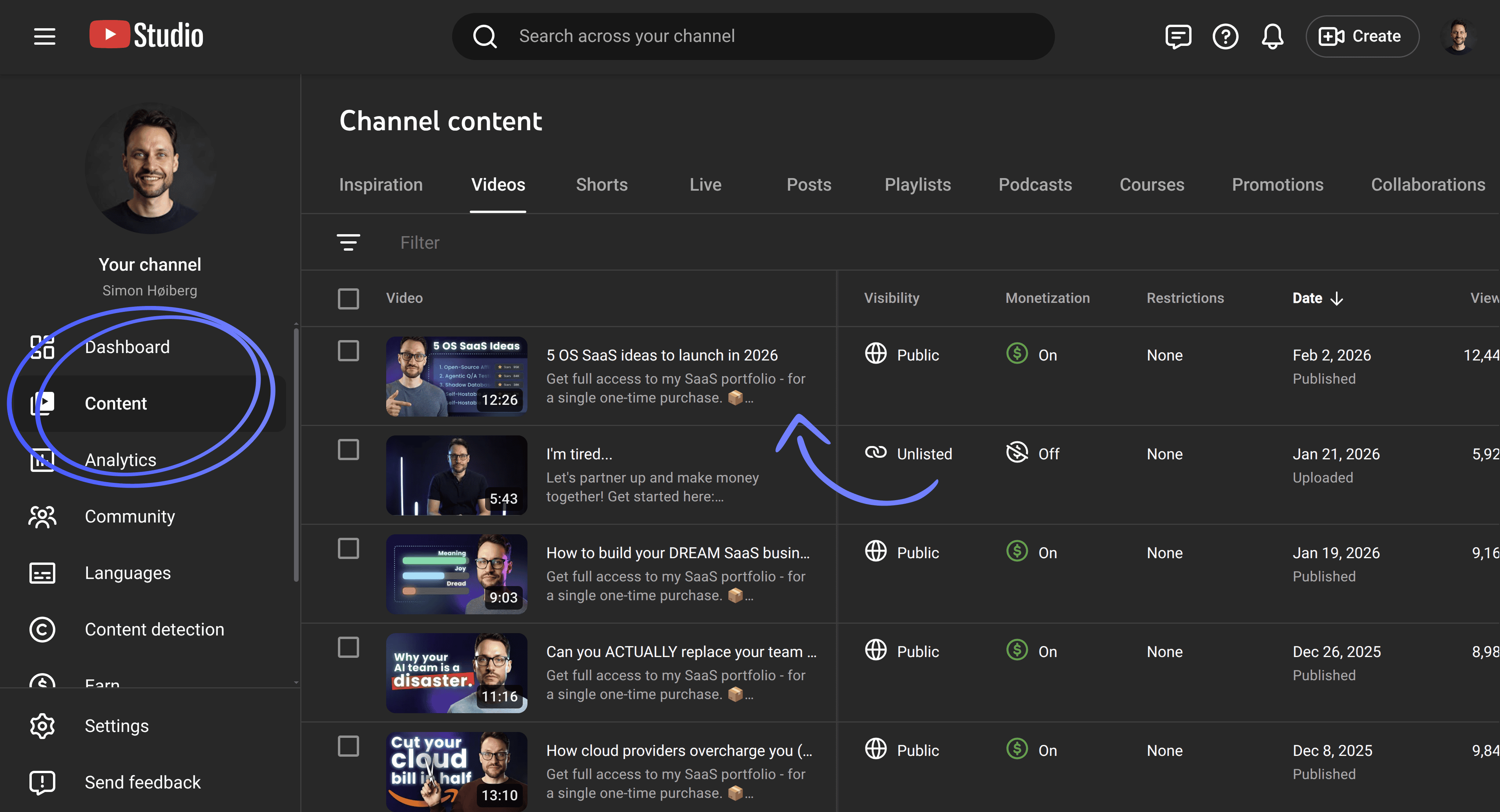
- Open YouTube Studio
- Go to Content
- Click the video you want to edit
- In Thumbnail, click Upload thumbnail (or pick an auto-generated option)
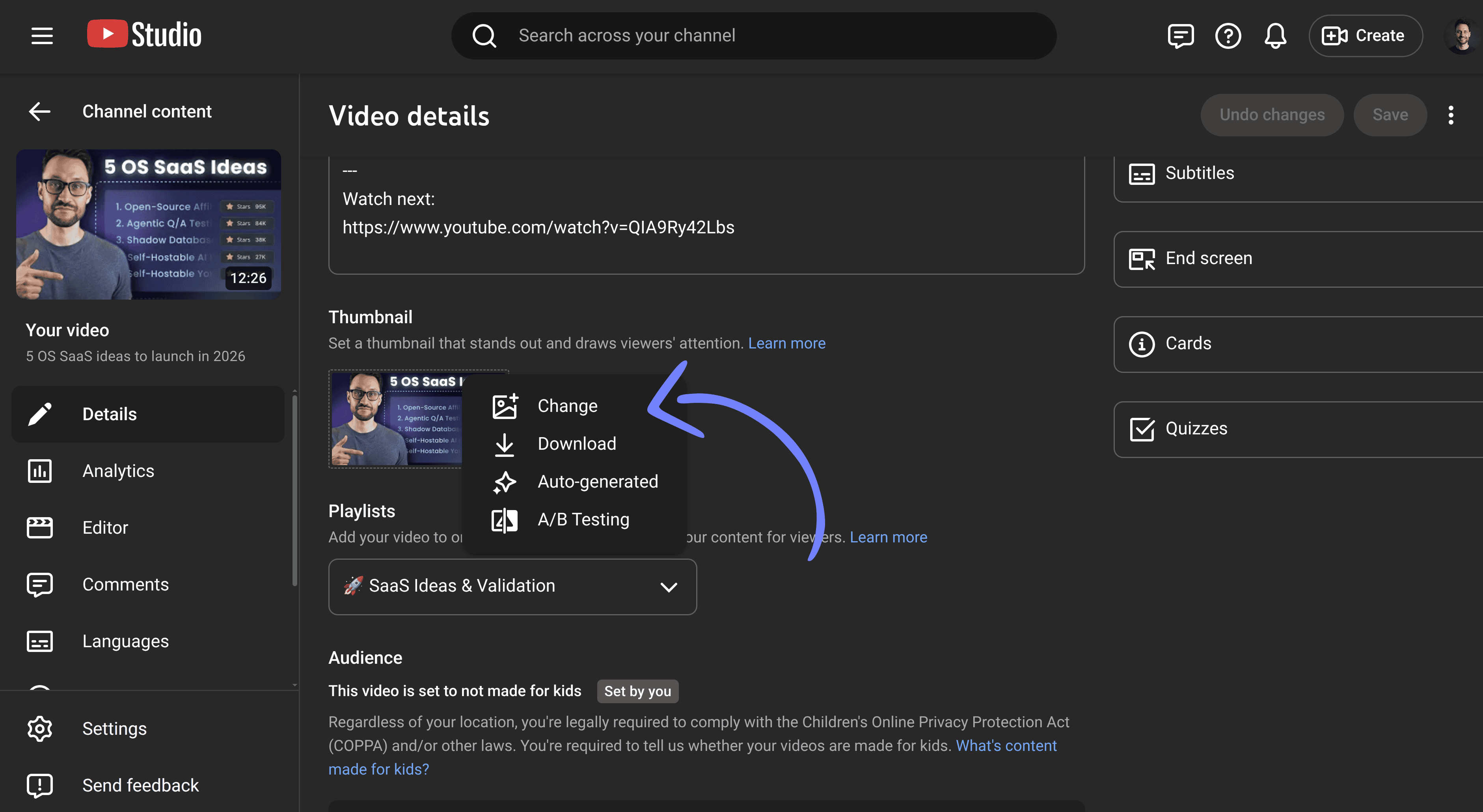 5) Click Save
Notes:
- Custom thumbnails require a verified channel
- Shorts thumbnail behavior can differ depending on device/surface
How to change your YouTube thumbnail (mobile)
Depending on device/region, the flow is typically:
- Open the YouTube app
- Tap your profile → Your videos
- Tap the three dots next to the video → Edit
- Tap Edit thumbnail
- Choose an auto thumbnail or upload a custom image
How to change your YouTube title (without hurting performance)
- In YouTube Studio → Content
- Click the video
- Edit the Title
- Click Save
Rules of thumb:
- Change the title to increase clarity, not to “game” keywords
- Don’t change thumbnail and title at the same time if you want to learn what worked
- If a video is already performing well, don’t over-optimize daily (you’ll create noise)
Why YouTubers change thumbnails and titles after posting
Most creators do it for one of two reasons:
- Mismatch: the video delivers X, but the packaging promises Y → low CTR or poor retention
- Generic packaging: the thumbnail/title is too bland to stand out → YouTube doesn’t push it
When you change packaging, the goal is simple: help the right viewers understand why your video is worth clicking.
A simple testing playbook (even without YouTube’s A/B testing)
Not everyone has access to YouTube’s native thumbnail experiments. You can still test in a reliable way:
1) Pick ONE variable
Choose one:
- Thumbnail (recommended first)
- Title
Changing both at once kills learning.
2) Wait for enough impressions
CTR is noisy. Don’t judge after a couple hundred impressions. Give it time to distribute.
3) Compare the right metrics
CTR alone isn’t enough. Look at:
- Impressions
- CTR
- Views
- Average view duration
- Watch time
The best outcome is higher CTR and strong retention.
4) Let it stabilize (48–72 hours)
A good baseline is 2–3 days. Avoid testing during unusual spikes.
5) Log the result
Keep a simple log:
- Date/time of change
- What you changed
- CTR + impressions before/after
- Watch time before/after
Then keep the winner—or revert if it clearly tanked.
What to test in thumbnails (ideas that actually move CTR)
High-leverage variables:
- Contrast (can you read it at phone size?)
- Simplicity (strong focal point)
- Emotion/curiosity (without cringe)
- Fewer words (legible text)
Most thumbnails fail because they try to say 5 things at once.
What to test in titles
Good titles make the click feel like the best decision.
Ideas:
- Make the promise specific (timeframe, result, constraint)
- Remove vague fluff (“ultimate”, “best”, “amazing”)
- Match expectations fast in the first 30 seconds
Avoid keyword stuffing and misleading clickbait.
Common mistakes
- Testing on too little data
- Changing multiple variables at once
- Changing too frequently
- Misleading packaging that tanks retention
Quick checklist
Before you change a thumbnail/title:
- Is the promise clear?
- Does the video deliver that promise quickly?
- Are you changing only one variable?
- Will you give it 48–72 hours?
TL;DR
- Yes, you can change your thumbnail and title after publishing
- Test one variable at a time
- Judge results using CTR + impressions + watch time
- Keep a simple log so you learn what works